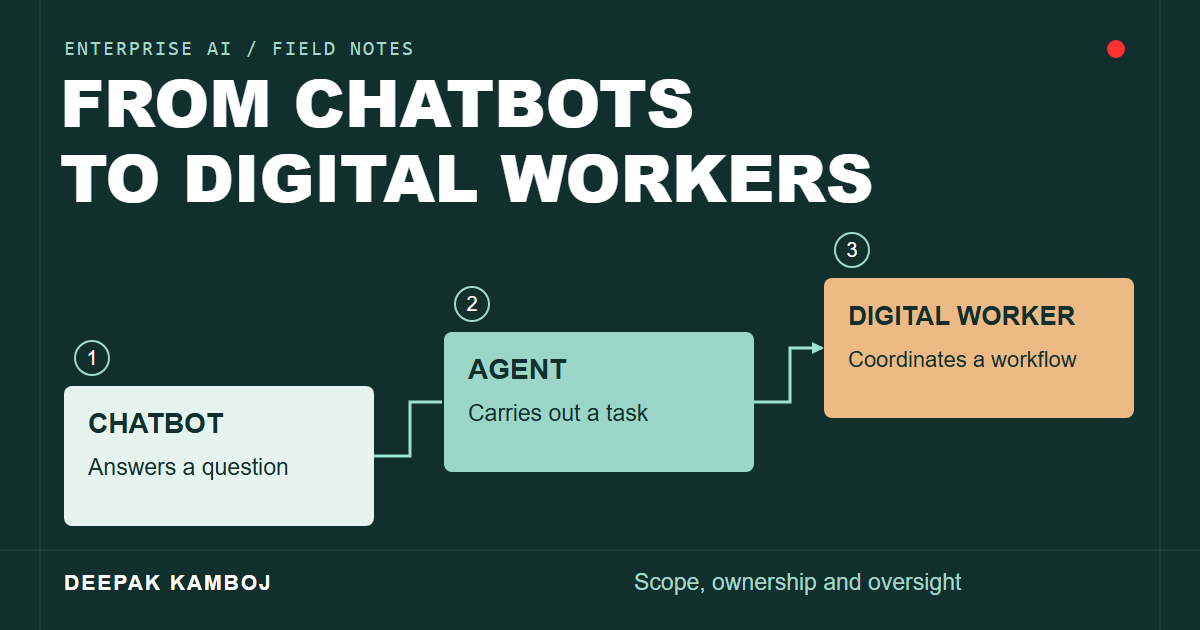
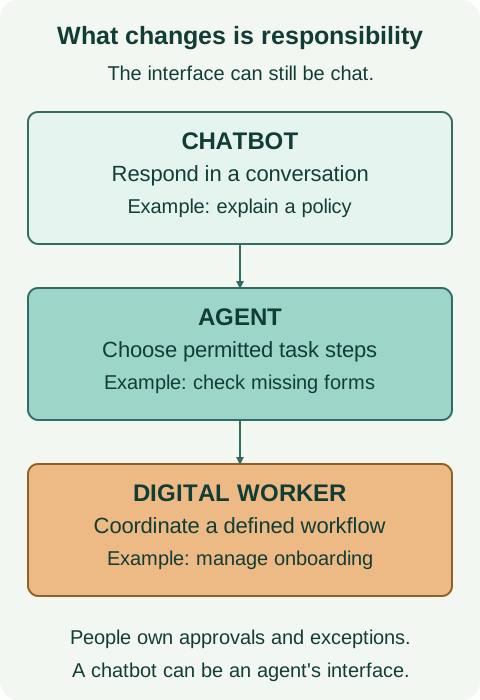
A chatbot can explain an employee onboarding policy. An agent could retrieve the right policy, check which forms are missing and prepare the next request. A digital-worker system might coordinate that process across HR, IT and payroll, with named people responsible for approvals and exceptions.
That shift changes what an organization has to build and supervise. Once software can act across systems, judging the quality of its answers is no longer enough. You also need to know what it changed, whether it had permission and what happens when the process fails halfway through.
Understanding the Evolution
Traditional chatbots concentrate on the conversation. They answer questions, guide users through known paths or route a request to the right team. Many do that work well without needing an open-ended decision loop.
An agent adds a way to plan and act toward a goal. It can retrieve context, call an external tool, inspect the result and decide what to attempt next. A language model may help choose those steps, while application code controls access and execution.
The interface doesn't settle the distinction. A chatbot can be the front end for an agent, and an agent can run in a background process without any chat window.
Key Characteristics of AI Agents
The useful characteristics are operational, not a matter of how human the system sounds.
Autonomy and goal-driven behavior
Instead of receiving an instruction for every step, an agent receives a goal and chooses intermediate actions within a defined scope. The amount of autonomy is a design decision. A system can be useful while still requiring approval at important points.
Tool integration and system connectivity
Tools connect the agent to databases, applications, APIs, collaboration platforms and cloud services. That connection lets it retrieve current information or perform an operation rather than describe what someone else should do.
Access to one system should not imply access to everything. A service that reads account status needs different permissions from one that changes account settings.
Memory and context retention
An agent can retain task state and retrieve selected information from previous interactions. Records of earlier decisions and outcomes may help it handle later work.
That does not mean every interaction improves the model. The value depends on what is stored, how it is retrieved and whether it is still accurate. Retention and deletion rules matter as much as retrieval.
Multi-step workflow execution
Some requests cross several applications and involve handoffs. An agent can coordinate those steps, keep track of unfinished work and check results along the way.
The workflow still needs a way to handle timeouts, duplicate requests and partial completion. Repeating an action is not always safe.
Adaptive decision-making
An agent can use new observations to revise its next step. This can be useful in dynamic pricing, supply-chain operations or financial applications, but the consequences differ sharply between reading a signal and executing a transaction.
Time-sensitive or high-impact decisions need controls appropriate to the action. The ability to react quickly is not evidence that the decision is correct.
From Agents to Digital Workers
"Digital worker" describes a broader assignment of responsibility. It usually means a system organized around a business function, potentially coordinating several agents, robotic process automation bots and other integrations.
An individual agent might classify a service request. A digital-worker system could coordinate the request from intake through resolution, while sending exceptions to a person.
Customer onboarding, invoice processing and IT service requests are possible examples. The name alone says little about how autonomous or reliable an implementation is.
Before assigning a workflow to such a system, define its boundaries. Name the process owner, identify permitted actions and decide who takes over when it cannot finish. People remain accountable even when fewer steps require manual execution.
Enterprise Use Cases and Value
Start with the work, not the label. Each of these use cases needs a specific definition of success.
Customer service and support
An agent can check account status, guide basic troubleshooting or help with password-reset flows. Identity verification and existing access controls still apply. More complex or uncertain cases need an escalation path that preserves the context already collected.
Measure completed resolutions and incorrect actions, not just the number of conversations handled.
Finance and accounting
Invoice extraction, transaction reconciliation, claims preparation and financial reporting can combine document processing with ERP and database access.
Preparing a payment is different from authorizing it. An early deployment can produce a draft or an exception report while a person reviews financial actions.
Human resources
Onboarding, benefits enrollment and policy questions involve repeated steps across different systems. An agent may help gather information and coordinate those steps, but employment and benefits data require carefully scoped access.
IT operations
Agents can collect diagnostics, triage incidents, maintain tickets and propose remediation. Executing a remediation script needs separate checks for the target environment, privileges and possible side effects.
Continuous availability also depends on the services the agent calls. A running agent cannot complete a workflow if its required API is unavailable.
Knowledge work
Research, analysis and drafting involve unstructured material such as legal documents, chat logs and email. An agent can retrieve and compare that material, but its output still needs to be checked for source quality, omissions and unsupported conclusions.
Supply chain and logistics
Inventory monitoring, shipment coordination, supplier communication and disruption handling span several sources of changing information. An agent may help coordinate a response. Changes to orders or commitments should follow the organization's approval rules.
Benefits Driving Adoption
The potential benefits are worth testing, but they are not automatic outcomes of adding a model.
Faster execution and continuous operations
Automating repeated steps can reduce waiting time and make work available outside business hours. Measure elapsed time for complete tasks, including approvals, retries and exception handling. A fast generated response is not the same as a fast completed process.
Scalability
A workflow that works for 10 tasks may behave differently at 1,000. Model quotas, downstream rate limits, queue capacity and the number of exceptions people can review all affect throughput.
Test those limits before promising consistent performance at a higher volume.
Cost efficiency
High-volume work such as data entry, service requests and claims processing may cost less to perform with automation. The comparison should include model usage, integrations, monitoring, human review and the cost of correcting mistakes.
Decision speed
An agent can collect and summarize information faster than a person could read every source individually. That can shorten a decision cycle, provided the information is current and the result is checked.
Time for other work
Reducing repetitive administration can give people more time for analysis, product work or direct customer support. Whether that happens depends on the actual workload left behind, including the new review and maintenance tasks.
Risks and Governance Considerations
The same access that makes an agent useful can make an error costly.
Autonomous decision-making
A bad decision can affect customer relationships, operations or compliance. Repeating it across many cases makes the problem larger. Limits on scope and transaction volume, approval rules and a working stop mechanism reduce that exposure.
Data quality and trust
Siloed, inconsistent or outdated information can lead to incorrect actions. The system needs to identify where a fact came from and what to do when sources conflict or a required value is missing.
Security and access control
Give each agent an identity and only the permissions its task requires. Protect sensitive data, validate tool inputs and keep records of actions. External documents and tool responses should be treated as data, not as permission to ignore application rules.
Human oversight
Automation changes the review work; it doesn't remove responsibility. Someone needs to handle exceptions, assess quality, approve sensitive actions and respond to failures.
Make those duties explicit. "A human is in the loop" is not useful unless the person has enough information, authority and time to intervene.
Operational complexity
Integrations fail, policies change and users submit unexpected requests. Deployments need monitoring, versioned configurations, a recovery plan and a way to return work to people when automation cannot proceed.
Building an Agentic Future
Choose a bounded process with clear inputs and a result you can verify. A service-desk lookup, a draft invoice reconciliation or a read-only diagnostic task is easier to assess than a system allowed to make unrestricted changes.
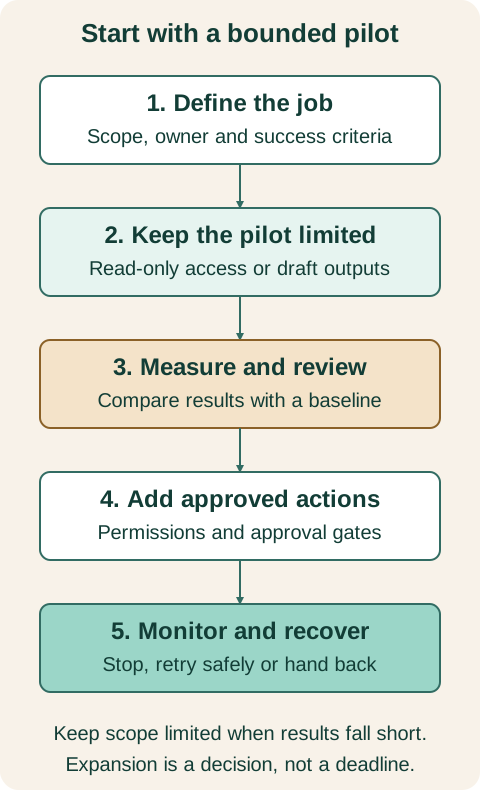
In a pilot, record the starting level of accuracy, completion time, cost and manual effort. Compare the agent against that baseline, including failed cases. Use the results to decide whether to expand the scope, keep it restricted or stop the experiment.
Data quality, integration work and oversight need funding alongside model usage. If nobody owns those responsibilities, increasing the number of automated workflows will make the gaps harder to manage.
Looking Ahead
More business software may incorporate agents behind familiar interfaces. Some will assist with a small task. Others will coordinate a larger process across several systems.
The useful question is which actions a particular implementation can perform reliably under its actual operating conditions. Give it a defined job, test the boundaries and make its work inspectable before giving it a wider remit.
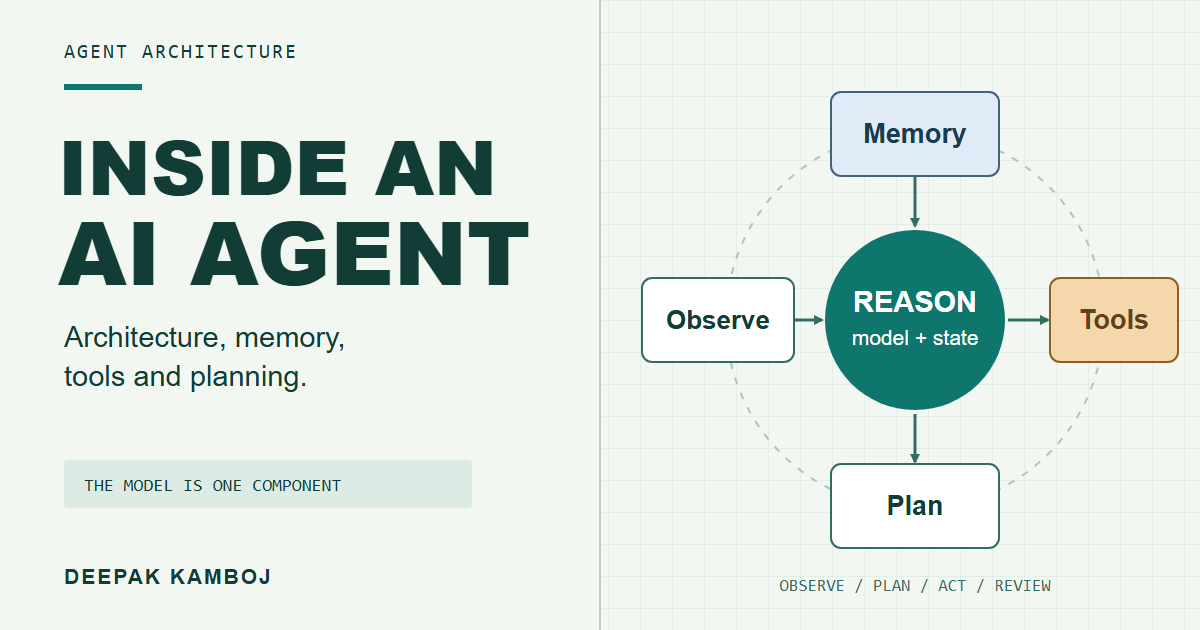
For the components behind that behavior, read Inside an AI Agent: Architecture, Memory, Tools and Planning.